

What is Python?
Python is an object-oriented programming language created by Guido Rossum in 1989. It is ideally designed for rapid prototyping of complex applications. It has interfaces to many OS system calls and libraries and is extensible to C or C++.
Python programming is widely used in Artificial Intelligence, Natural Language Generation etc. Python had deep focus on code readability & this blog post I will try to explain you python from basics. Stay with TechNext to learn Python in 7 days. Solve the assignments provided each passing day.
To get started, today we will discuss about only installing Python in your Windows Machine. Follow Below 2 Steps of Installation: 1. Install Python 3 in Windows 2.Install Pycharm IDE
1.Install Python 3 In your Windows
Step 1) To download and install Python visit the official website of Python http://www.python.org/downloads/ and choose your version as Python 3.7.3

Step 2) Once the download is complete, run the .exe for install Python. Now click on Install Now. Follow the Wizard until you get to see “Setup was Successful”. Close that dialog and go for our second task to install Pycharm.
2.Install Pycharm IDE
Step 1) To download PyCharm visit the website https://www.jetbrains.com/pycharm/download/ and Click the “DOWNLOAD” link under the Community Section.
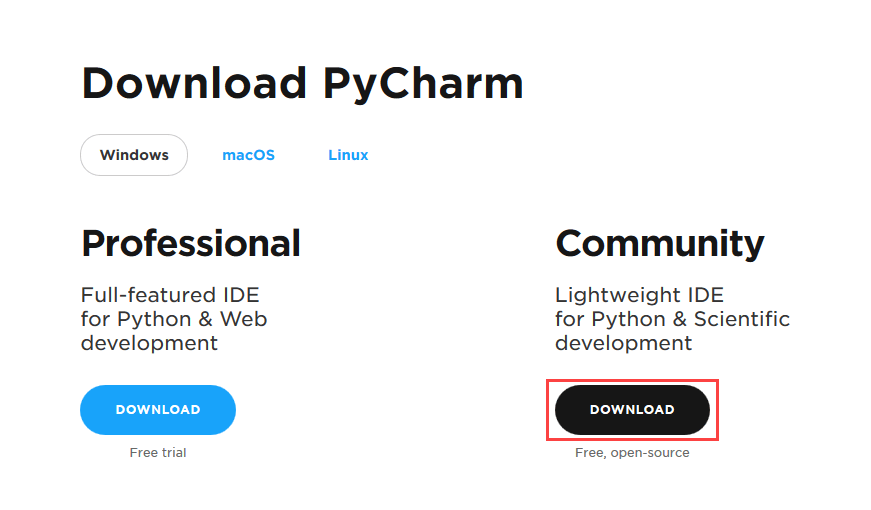
Step 2) Once the download is complete, run the exe for install PyCharm. The setup wizard should have started. Click “Next”. Follow the setup Wizard and start Pycharm.
That’s all about Installation Process!!. In the next tutorial we will discuss How to create your first Python Program..

 DevScript Saga
Leave a comment