
Welcome back to the next AntiHacking Solutions. In the previous post (Part-1: Phishing) , we have seen Phishing method used by Hackers for hacking social media. I hope all have understood it. In this article , we are going to see the “What is Keylogging and how to secure our social media accounts from it?” Lets get started!!
Keylogging is one of the easiest ways to hack a social media account. A keylogger is a program that records and monitors the user’s input and keeps a log of all keys that are entered. The keylogger can actively send your inputs to hackers via the Internet.
For example, when you check your email, you might type in “mail.yahoo.com” or “gmail.com” in the address field of your browser. Predictably, your next step is to type in your username and password. Everything you type is sent to a hacker database over the internet, where the text is parsed through to pick out the sensitive parts, like your password.
Keyloggers don’t slow down your computer and you won’t even notice when one is in operation. Windows 10 even has a keylogger built into the operating system. Although there are some legitimate uses of keyloggers, such as in the workplace, or to track the internet activities of children, you are also at risk of these programs turning your computer into a spy for hackers.
You have to be very careful while dealing with keyloggers because even the computer experts become victims of keylogging.
How to detect Keyloggers?
One more place to look for suspicious activity is in the report of internet usage on your computer.
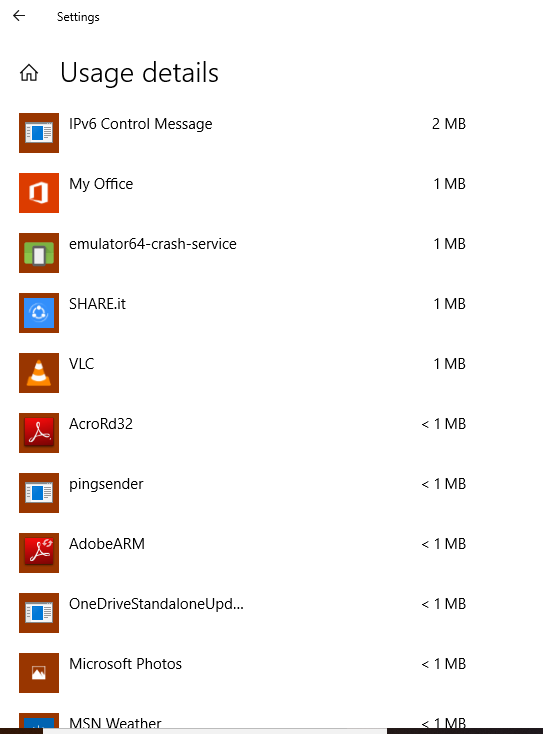
On Windows, press the Windows button and “I” together. This will get you to the settings screen. Select Network & Internet and then select the Data usage option in the left-hand menu. Click on View usage details to get a list of all the programs on your computer that are using the internet. Do a web search on any of the names you don’t recognize to see if they are keyloggers.
Perform similar checks on your browser extensions. Look through the extensions and disable any that you don’t remember installing or that you never use.
To get to extensions:
In Chrome: Type chrome://extensions into the address field
In Firefox: Type about:addons in the address field
In Opera: Select Extensions from the menu then click Manage Extensions
In Safari: Select Preferences from the Safari menu and then click on Extensions
In Internet Explorer: click on Manage add-ons in the Tools menu
In Microsoft Edge: click on Extensions in the browser menu
How to get rid of KeyLoggers??
Antikeylogger software gives you a better chance of getting rid of keyloggers than general antimalware or even anti-spyware utilities.
It may take some time for you to get rid of the keylogger, and ultimately, you might have to reinstall your operating system to completely wipe it away.


Leave a reply to How Can Hackers Hack Social Media Accounts: Part 3: MIME – techNext Cancel reply